WhatsApp Stylish Text Generator – Fancy Fonts for Chats & Bio
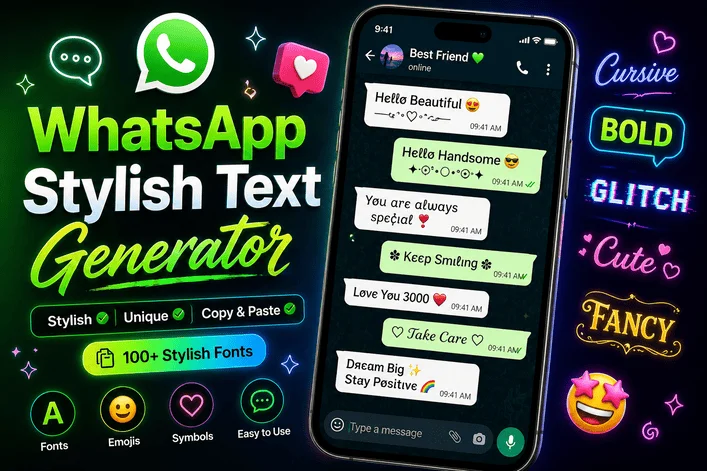
WhatsApp Stylish Text Generator – Fancy Fonts for Chats & Bio

Introduction:

Ever noticed how some WhatsApp messages instantly grab attention? It’s not just what they say—it’s how they look. That’s where a WhatsApp Stylish Text Generator – Fancy Fonts for Chats & Bio becomes a game-changer.

Instead of sending plain, boring text, you can transform your messages into stylish fonts, aesthetic symbols, and creative designs within seconds. Whether you want a cool bio, unique status, or attention-grabbing chats, stylish text helps you stand out in a crowded inbox.

WhatsApp Stylish Text Generator – Fancy Fonts for Chats & Bio

In a world where digital communication is fast and visual, small creative touches—like fancy fonts—can make a big difference. Let’s explore how these tools work, why they’re so popular, and how you can use them effectively.

What is a WhatsApp Stylish Text Generator?

A WhatsApp Stylish Text Generator is an online tool that converts normal text into decorative fonts using Unicode characters. These fonts are not actual font files but special characters that mimic stylish typography.

Example:

  • Normal: Hello World
  • Stylish: 𝓗𝓮𝓵𝓵𝓸 𝓦𝓸𝓻𝓵𝓭
  • Fancy: 🅷🅴🅻🅻🅾 🆆🅾🆁🅻🅳

These can be copied and pasted directly into WhatsApp chats, bios, or statuses.

Why Stylish Text is Trending on WhatsApp ?

Stylish text isn’t just a trend—it’s a form of digital self-expression. Here’s why it’s booming:

1. Personal Branding

Your WhatsApp bio reflects your personality. Stylish fonts make it memorable.

2. Attention-Grabbing Chats

In group chats, stylish text stands out instantly.

3. Social Influence

Influencers and creators use unique fonts to build identity.

4. Easy to Use

No app installation—just type, copy, and paste.

How Does It Work? (Simple Explanation)

Unlike traditional fonts, stylish text generators use Unicode symbols, which are supported across most devices.

Steps to Use:

  1. Enter your text into the generator
  2. Choose a stylish font
  3. Copy the generated text
  4. Paste it into WhatsApp

That’s it—no technical skills required.

Best Uses of Stylish Text on WhatsApp

1. WhatsApp Bio (About Section)

Make your profile unique with creative fonts.

Example:

  • ✨ Dreamer | Believer | Achiever ✨
  • 𝓛𝓲𝓿𝓮 𝓵𝓲𝓯𝓮 𝓲𝓷 𝓼𝓽𝔂𝓵𝓮

2. Chat Messages

Send stylish messages to impress friends.

Example:

  • 𝓗𝓸𝔀 𝓪𝓻𝓮 𝔂𝓸𝓾? 😊
  • 🅻🅴🆃’🆂 🅼🅴🅴🆃 🆃🅾🅳🅰🆈

3. WhatsApp Status

Make your status visually appealing.

Example:

  • 🔥 𝓞𝓷 𝓽𝓸𝓹 𝓸𝓯 𝓽𝓱𝓮 𝔀𝓸𝓻𝓵𝓭 🔥

4. Special Occasions

Perfect for birthdays, wishes, or celebrations.

Comparison: Normal Text vs Stylish Text

FeatureNormal TextStylish Text
AppearancePlainEye-catching & decorative
EngagementLowHigh
CreativityLimitedUnlimited styles
UsageBasic messagingBio, status, branding
Effort RequiredNoneMinimal (copy-paste)

Types of Fancy Fonts You Can Use

1. Cursive Fonts

Elegant and aesthetic
Example: 𝓗𝓮𝓵𝓵𝓸

2. Bold & Block Fonts

Strong and impactful
Example: 🅷🅴🅻🅻🅾

3. Glitch & Weird Fonts

Unique and edgy
Example: H̷e̷l̷l̷o̷

4. Small & Tiny Fonts

Minimal and cute
Example: ʜᴇʟʟᴏ

5. Emoji + Text Combos

Fun and expressive
Example: 💖 Hello 💖

Key Insights: What Most People Don’t Know

1. Not All Fonts Work Everywhere

Some stylish texts may not display properly on older devices.

2. Overuse Can Backfire

Too many fancy characters can make text hard to read.

👉 Tip: Use stylish text for highlights—not entire paragraphs.

3. It’s Not a Real Font System

These are Unicode symbols, not actual fonts. That’s why they work without installation.

4. SEO & Branding Advantage

If you run a website (like a font generator), this trend is a huge traffic opportunity.

People search for:

  • stylish text for WhatsApp
  • fancy fonts copy paste
  • WhatsApp bio styles

Pro Tips to Use Stylish Text Effectively

Keep It Readable

Avoid overly complex styles.

Use for Emphasis

Highlight key words instead of entire sentences.

Stay Consistent

Use one or two styles for branding.

Combine with Emojis

Adds personality and visual appeal.

Common Mistakes to Avoid

  • ❌ Using too many symbols
  • ❌ Copying unreadable fonts
  • ❌ Overloading bios with decoration
  • ❌ Ignoring compatibility issues

How to Choose the Best Stylish Text Generator ?

Not all tools are equal. Look for:

Variety of Fonts

More styles = more creativity

Fast Copy-Paste

Instant results matter

Mobile-Friendly Design

Most users are on phones

No Login Required

Quick access improves user experience

Ideas for WhatsApp Stylish Bios

Here are some ready-to-use ideas:

  • ✨ 𝓢𝓲𝓶𝓹𝓵𝓮 𝓵𝓲𝓯𝓮, 𝓫𝓲𝓰 𝓭𝓻𝓮𝓪𝓶𝓼 ✨
  • 🔥 Born to shine 🔥
  • 💫 𝓒𝓻𝓮𝓪𝓽𝓮. 𝓘𝓷𝓼𝓹𝓲𝓻𝓮. 𝓡𝓮𝓹𝓮𝓪𝓽 💫
  • 😎 Stay classy

Future of Stylish Text in Messaging Apps

Stylish text is evolving fast. With growing personalization trends:

  • Messaging apps may add built-in font features
  • AI tools will generate custom styles
  • Digital identity will become more visual

This means tools like stylish text generators will only become more valuable over time.

Conclusion:

The WhatsApp Stylish Text Generator – Fancy Fonts for Chats & Bio is more than just a fun tool—it’s a powerful way to express yourself in the digital world.

From creating eye-catching bios to making your messages unforgettable, stylish text gives you an edge in everyday communication. The best part? It takes just seconds to transform ordinary text into something extraordinary.